
Spotisaver Review 2026: Is It Safe & Legit? Best Alternative? [Tested]
Online Spotify downloaders come and go like a breeze. Spotisaver — a free, browser-based service that turns Spotify links into downloadable MP3s and is currently in beta — is a newcomer. Thinking about giving Spotisaver a try? Give us a minute first.
We put it through a hands-on test, checking its safety and legitimacy and testing its download performance with a single track, a podcast, and a 20-song playlist. We also investigated the "No available slots" error that can occur during downloads. To put the results into perspective, we compared the overall experience with Kigo Spotify Converter, a professional desktop alternative.
So, is Spotisaver really the right tool to convert Spotify playlists to MP3 for free? Keep reading this Spotisaver review to see what we actually found.
Spotisaver surprised us with its clean interface and uninterrupted workflow. In our tests, it handled single-track MP3 downloads well, but playlist downloads were unreliable — two of our three attempts failed with "no available slots" errors. There is also a privacy concern: every link you paste is processed on a third-party server that you cannot audit. For reliable batch downloads, Kigo Spotify Converter is the better choice.
Contents
- Part 1. Quick Verdict: Spotisaver at a Glance
- Part 2. What Is Spotisaver & How It Works
- Part 3: Is Spotisaver Safe and Legit?
- Part 4: How Does SpotiSaver Perform with Playlists and Podcasts?
- Part 5: Why Is SpotiSaver Not Working? "No Available Slots" Explained
- Part 6: SpotiSaver Alternatives: When to Switch
- Part 7: Spotisaver vs Kigo Spotify Converter: Head-to-Head
- Part 8: FAQs about Spotisaver Playlist Downloader
Part 1. Quick Verdict: Spotisaver at a Glance
| Dimension | Score | Our take |
|---|---|---|
| Ease of use | 9/10 | No install or sign-up required — paste a link and click Download |
| Audio quality | 6/10 | Fine on our test track — but it varies with each matched source |
| Playlist reliability | 3/10 | 1 success in 3 attempts, ~18 seconds per track |
| Safety & privacy | 5/10 | No malware behavior observed — but your links pass through a server you can't audit |
| Value | 6/10 | Free tier is usable; Premium adds speed, not stability |
Key Findings from Our Test
- What worked: Single-track downloads completed quickly, with no ads, redirects, or installation required.
- What didn't: A 20-track playlist failed on two out of three attempts before eventually completing successfully.
- Safety scan: VirusTotal flagged the site URL on 2 of 90 engines as of September 8, 2026. The downloaded MP3 file itself was detected by 0 of 60 engines.
- Price: A free tier is available, along with an optional Premium upgrade.
Part 2. What is Spotisaver & How it Works?
➡️ What Spotisaver is — and isn't
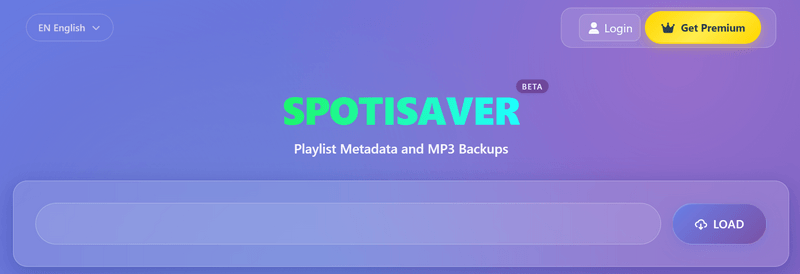
In short, Spotisaver is an online Spotify to MP3 converter: paste a Spotify link into your browser, and it returns a downloadable audio file, with no app to install and no account to create. What it is not is a Spotify downloader in the usual sense: it never accesses or downloads Spotify’s audio stream. Instead, it identifies the song from your link and finds a matching recording elsewhere. The official page puts it more formally, describing the service as a “Playlist Metadata and MP3 Backups” tool and stating that "Spotify audio is not accessed or downloaded."
➡️ How to use Spotisaver?
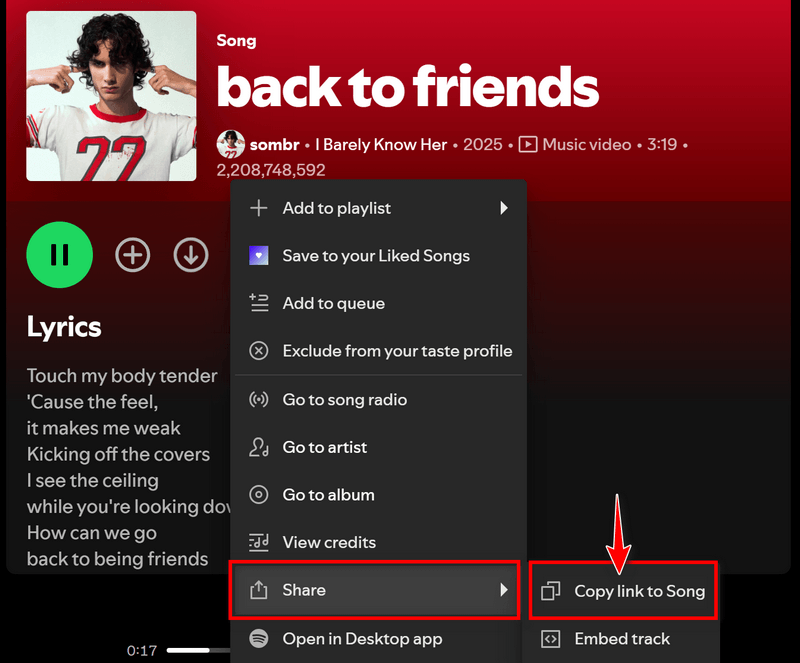
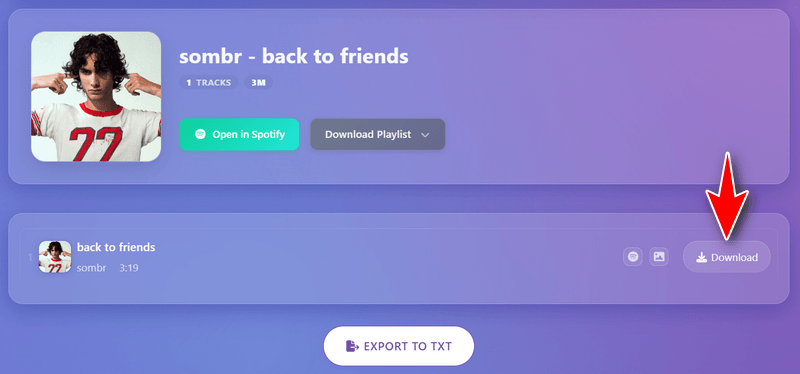
- Step 1Copy the link of the track, album, or playlist you want from Spotify (Share → Copy ling to Song).
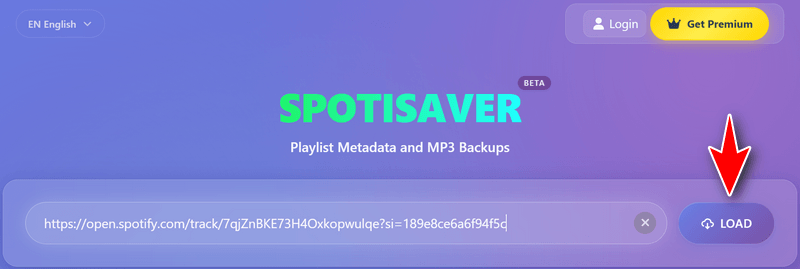
- Step 2Open Spotisaver.net and paste the link into the box.
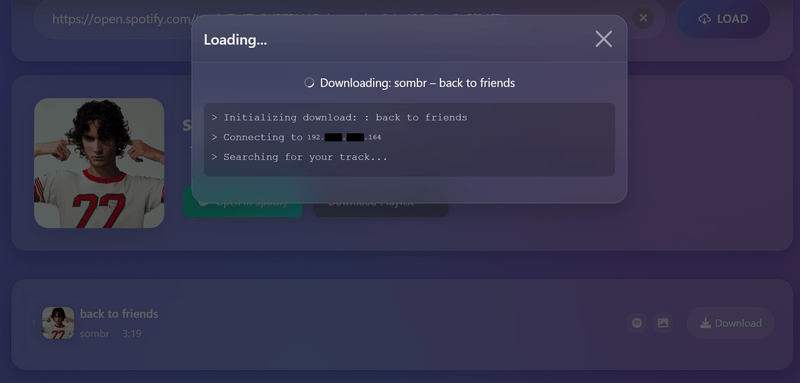
- Step 3 Click Load and wait while the site processes the link.
- Step 4 Click Download and save the resulting MP3 to your computer.
➡️ How does Spotisaver work?
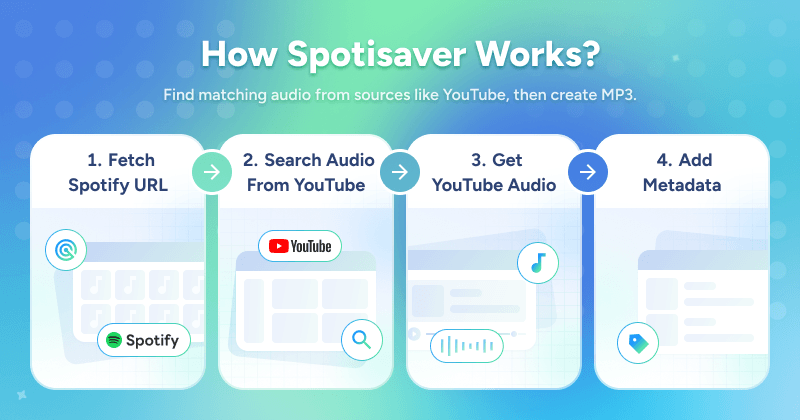
Spotisaver is not a Spotify downloader, so how does it download MP3 songs from Spotify? Where do those MP3 files actually come from? The answer lies in what happens behind the scenes on Spotisaver's infrastructure:
- Read: The server extracts metadata from your Spotify link, including the track title, artist, and album name.
- Match: It searches external audio sources, typically YouTube uploads, for a matching recording.
- Re-encode: It converts the matched audio to MP3 format and adds Spotify-style metadata tags.
- Deliver: The finished file is then served from Spotisaver’s server for you to download.
➡️ Test results: what our download actually contained
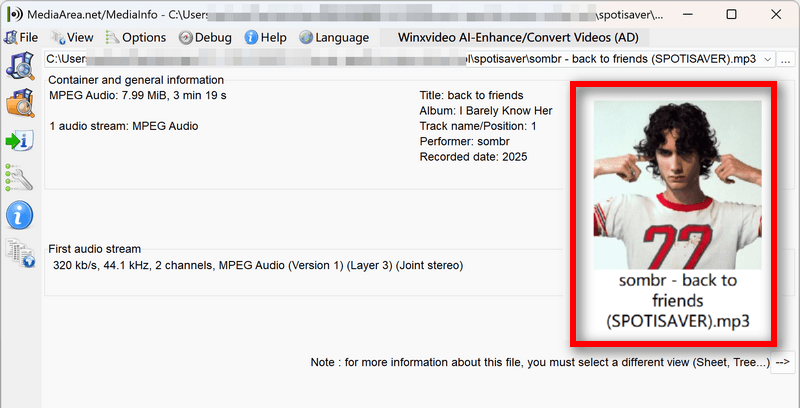
By following the four steps above, we got the test track downloaded in just a few seconds. Here’s what the resulting file contained:
Format: An MP3 at 320 kbps, with a file size of 7.99 MB.
Tags: ID3 tags are present, but the metadata is incomplete and contains errors: the track number and position fields are incorrect, likely inherited from the matched source, while the track name and total-track fields are missing.
Filename: sombr - back to friends (SPOTISAVER).mp3 — the site name is added to every free download, and you can't change the naming pattern on the free tier.
Editor's note:
Quality is not consistent from one download to the next. The official page's only bitrate claim is “Up to 320 kbps MP3 when available” — what you hear ultimately depends on whichever upload the server matches. Also, every free-download filename carries a [SPOTISAVER] tag that you can't change without Premium.
Part 3. Is Spotisaver Safe and Legit?
To evaluate whether Spotisaver is safe, we break the question down into four areas and assess each through hands-on testing and virus-detection tools: Will it harm your computer? What happens to your data? Can you trust the file you get back? And will the server come through when you need it? The first is about your computer; the other three trace back to one fact: Spotisaver is a middleman — a third-party server doing every step between your link and your MP3.
➡️ Will it hurt your computer?
Across our tests of single tracks, a 20-track playlist, and a podcast link, we saw no install prompts, account walls, ad pop-ups, or redirects. We then ran both the site and a downloaded MP3 file through VirusTotal:
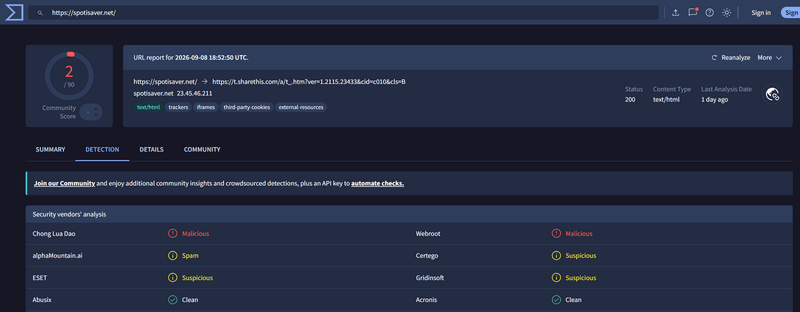
- Site URL: Flagged by 2 of 90 engines (scanned 2026-09-08)
- Downloaded MP3: 0 of 60 engines flagged it.
➡️ What happens to your data?
From Part 2: read, match, re-encode, deliver — all four steps take place on Spotisaver's servers; only the pasting and clicking happen on your machine. This means your Spotify link has to be sent to a third-party server for processing. What happens to that data after it reaches the server is less clear, especially if the service does not provide enough information to independently verify how links, IP addresses, or download activity are handled. A public playlist link can also reveal your music curation outright.
➡️ Can you trust the file you get back?
A scan only proves that one file, at one moment, contained no known malicious payload. It can't verify the chain behind the file, and the server could change what it delivers at any time. The accountability gap works the same way: the copying happens on their infrastructure, while information such as your download requests could potentially be recorded in their logs. There is no contract, SLA, or dedicated support desk to provide additional accountability.
➡️ Will the server come through when you need it?
We stress-tested the free tier: a 20-track playlist took 3 attempts, with only 1 success, and returned a "No available slots" error even at 05:50 AM Eastern — an off-peak hour when demand would generally be expected to be lower. It's also a beta project with no uptime guarantee — if the service disappears tomorrow, there may be no fallback.
So, is Spotisaver legit? The honest answer is less comfortable: the audio source is unclear, and so is the legal status of what you download. Spotisaver matches your link against external uploads, and rebuilds the matched audio as an MP3. You can't verify which upload was used or whether the uploader had the right to distribute it. Whether using the resulting files is permitted depends on your local copyright laws, applicable platform terms, and how you use the files. Our advice: treat downloads as personal offline listening only, and don't share or redistribute them.
Editor's note:
These risks aren't unique to Spotisaver — it's a structural trade-off of online downloaders. For a throwaway single track, many users may accept it. For a personal playlist, a local desktop converter like Kigo Spotify Converter avoids the middleman entirely.
Try Kigo Spotify Converter to Save All Your Favorite Spotify songs!
Download lossless FLAC audio. Convert Spotify songs to 320kbps MP3. Retain ID3 tags. 40X conversion speed.Part 4. How Does Spotisaver Perform with Playlists and Podcasts? Out of luck.
Single tracks are one thing, but if you want a converter for your daily listening, playlist and podcast support matters too. If you're thinking of using Spotisaver as your go-to tool for downloading Spotify playlists for free, though, you might be disappointed. And when it comes to Spotify podcasts, Spotisaver doesn't support them at all. Here's what we found in our tests:
What We Did and What We Found When Downloading a Playlist
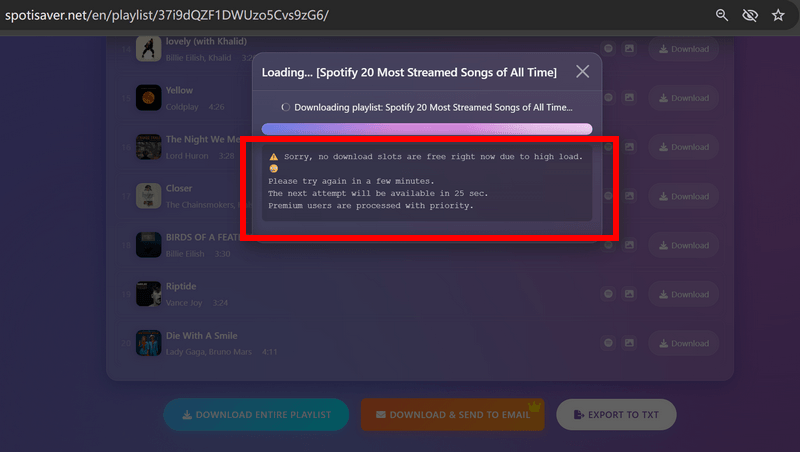
We followed the steps in Part 2 to download the 20-track "Spotify 20 Most Streamed Songs of All Time" playlist (Link: https://open.spotify.com/playlist/37i9dQZF1DWUzo5Cvs9zG6). The process started normally, but problems occurred during the loading step. First, the playlist cover art was missing. Then, the loading process failed with a "No available slots" error, so the download never started. After three attempts, it finally went through, taking about 6 minutes and 20 seconds to download all 20 tracks.
Spotify Podcasts Are Not Supported
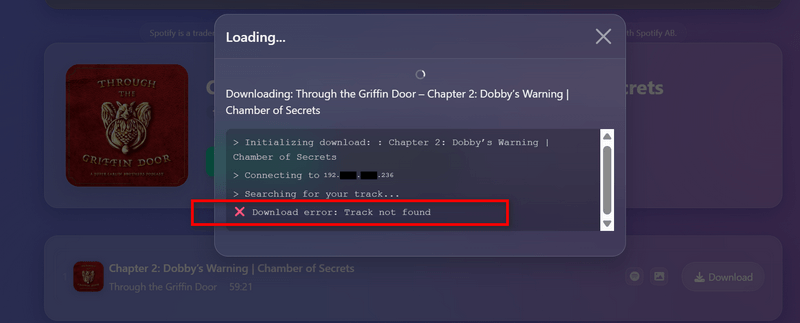
Spotisaver doesn't list podcasts as a supported content type, and our test confirmed that. We submitted a podcast episode link (https://open.spotify.com/episode/0nkg1hvpxtze1tYoxcCyco), and while parsing succeeded, the download failed with a "track not found" error. If podcasts or audiobooks are part of your use case, Spotisaver isn't designed for you.
What Are Other Users Saying?
According to Spotisaver reviews on Trustpilot, customers reported two issues: one received a different version of the song they expected, while the other experienced incomplete playlist downloads and long download times.
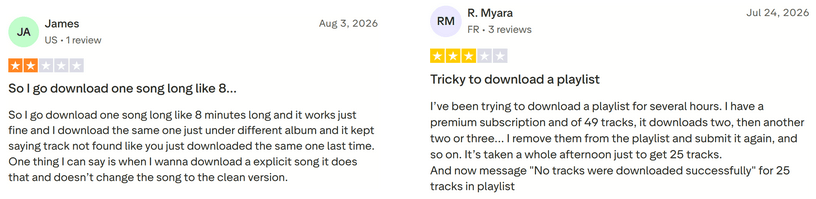
"…download one song like 8 minutes long and it works just fine and I download the same one just under different album and it kept saying track not found…"
"I've been trying to download a playlist for several hours. I have a premium subscription and of 49 tracks, it downloads two, then another two or three… It's taken a whole afternoon just to get 25 tracks."
The second reviewer is a Premium subscriber who reported the same playlist instability we encountered on the free tier. We'll look at this issue more closely in the following part, where the results may help you decide whether Spotisaver is worth paying for.
Part 5. Why Is Spotisaver Not Working? "No Available Slots" Explained
Why does Spotisaver stop working? Our two failed attempts above both stopped at the same point, showing the same message: "no download slots are free right now."
If you met the same error, it means that the free tier doesn't offer unlimited concurrent processing. Each download has to wait for one of a limited number of download slots on Spotisaver's servers. When all available slots are occupied, your download simply can't start. Our failed attempts happened at 05:50 AM Eastern — 02:50 AM Pacific — well outside peak hours for US users. Yet the slots were still full. In other words, testing during a quiet US hour didn't improve our chances of getting through. This suggests the available slots may be shared across regions rather than allocated by region. While US users are asleep, traffic from other parts of the world can still keep the queue busy. For users in the US, that means there may be no reliably quiet window to count on.
"No Available Slots" Troubleshooting
- Retry. In our test, the third attempt succeeded. But retrying a 20-track playlist means waiting and monitoring the page until a slot becomes available.
- Premium. The paid tier adds concurrent downloads and priority processing. This can reduce the waiting, but it doesn't necessarily eliminate server-side limitations. See below for what the Premium upgrade does and doesn't fix.
- Avoid the queue entirely. A local desktop converter processes downloads on your own computer, so there are no shared download slots or server-side queues to wait for.
What Premium Fixes — and What It Can't
Spotisaver has a Premium plan for €2 for 30 days, paid once via Ko-fi with no auto-renewal. It adds 1,000-track playlists, concurrent downloads, up to 2x speed, custom filenames without the [Spotisaver] tag, and background processing with email delivery.
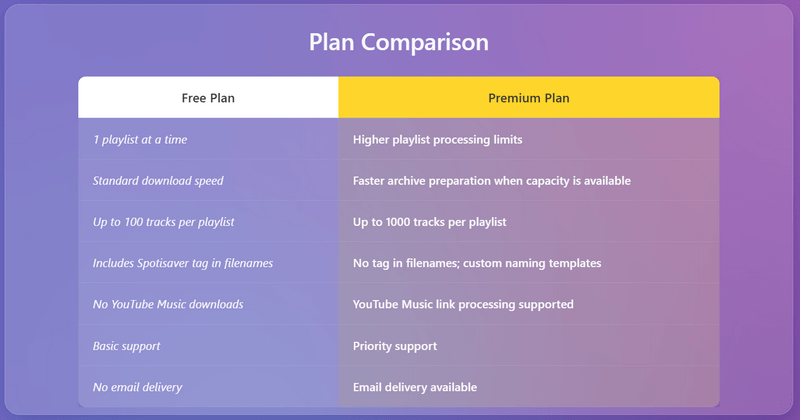
But Premium doesn't change the two issues we've identified: source quality still depends on external uploads, and stability still depends on Spotisaver's server-side slots and processing pipeline. As one Premium subscriber reported in Part 4, downloading 25 tracks could take an entire afternoon.
Part 6. Spotisaver Alternatives: When to Switch
Spotisaver isn't a bad tool — it works smoothly for grabbing MP3 songs online. However, whether it's the right choice depends on how you plan to use the downloaded music. For occasional offline listening, building a Hi-Fi library, or editing and DJing, different needs may call for different tools. The chart below gives you a quick overview of which option may be more suitable for each scenario.
The best alternative to Spotisaver is Kigo Spotify Converter — a desktop Spotify music converter for Windows and Mac that removes the server-side processing from the equation. Everything runs locally on your PC, so there are no shared download slots or queues, and your Spotify links don't need to be sent to a third-party server.

Key Features of Kigo Spotify Converter
- Download Spotify track, album, playlist, podcast, radio, audiobook.
- Convert Spotify music to MP3, AAC, FLAC, AIFF, WAV, or ALAC audio.
- Keep 100% original audio quality; preserve ID3 tags, lyrics.
- Enjoy up to 40x faster conversion speeds with batch downloads.
- Burn Spotify music to CD or export to iTunes with one click.
- Enable offline listening for both Spotify Free and Premium users.
- Activate the permanent playback of Spotify music.
Windows 11/10/8 Free Download
macOS 11 or later
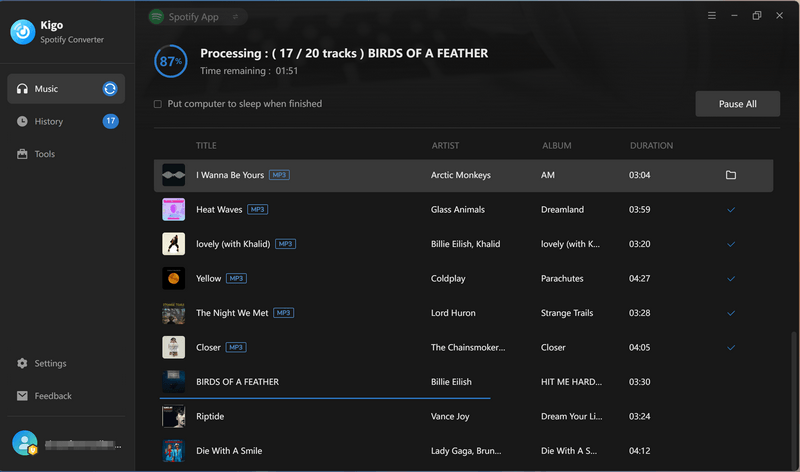
It supports the full range of Spotify content, including tracks, albums, playlists, podcasts, and audiobooks, and converts them to MP3, AAC, FLAC, WAV, AIFF, or ALAC. Lossless formats can preserve the original audio quality, while the conversion retains lyrics and complete ID3 tags. It also includes tools for playlist management, CD burning, audio editing, tag editing, and converting local audio files. Kigo Spotify Converter works with both Spotify Free and Premium accounts and is regularly updated. Here's how Kigo Spotify Converter works when downloading a playlist.
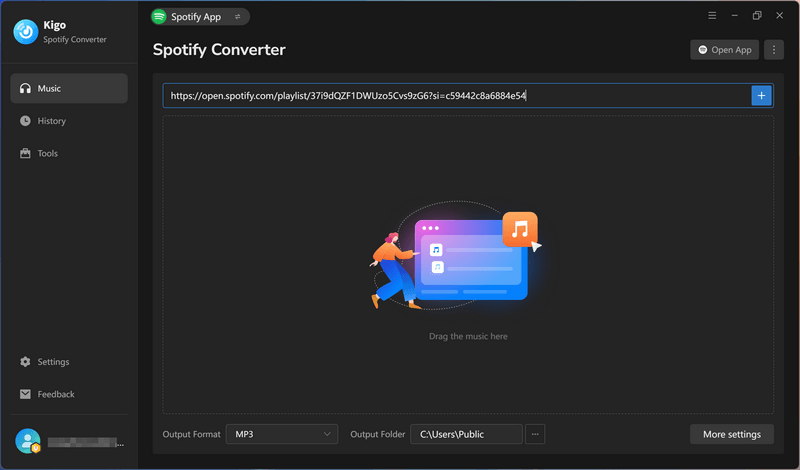
The workflow is familiar — paste a link, pick tracks, download.
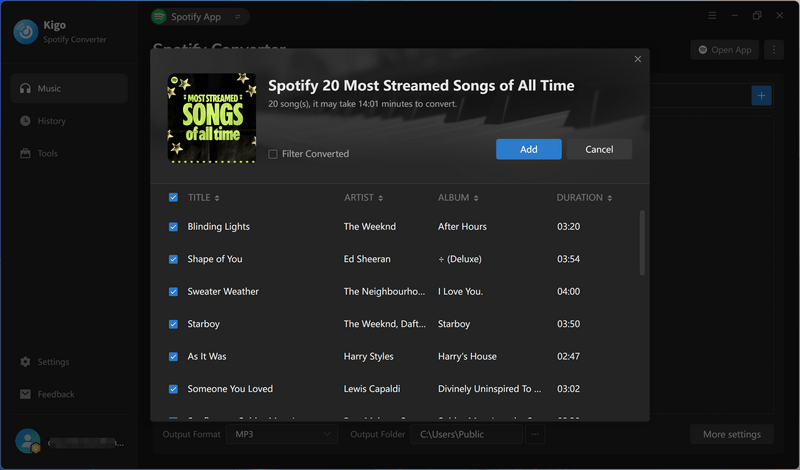
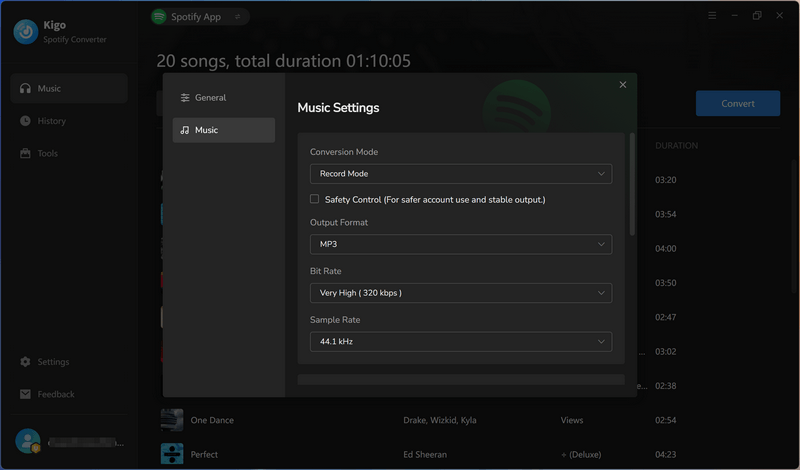
In Settings panel, you can customize output format (Recommended, MP3, AAC, FLAC, WAV, AIFF, or ALAC), Bit Rate (Up to 320kbps), Sample Rate and custom filename templates, such as track number + title or artist + title, so your library lands organized without manual renaming.
Click Download to start downloading the Spotify playlist to your local computer. The full playlist is saved as clean, numbered files in a folder — no ZIP file to unpack.
Part 7. Spotisaver vs Kigo Spotify Converter: Head-to-Head
| Feature | Spotisaver | Kigo Spotify Converter |
|---|---|---|
| Type | Online Spotify converter (browser) | Desktop Spotify music converter (Windows/Mac) |
| Download Podcasts | ❌ (failed in our test) | ✅ |
| Download Audiobooks | ❌ (not supported) | ✅ |
| Download Music Videos | ❌ (not supported) | ✅ (MP4) |
| Audio Source | Matches external uploads (e.g., YouTube) on their servers | Converts directly from Spotify on your PC |
| Maximum Audio Quality | Up to 320 kbps MP3 "when available" | Lossless output option; 320 kbps MP3 |
| Output Formats | MP3 | MP3, AAC, FLAC, WAV, AIFF, ALAC, MP4 |
| Batch Download | ✅ — but slot-dependent; 100 tracks per playlist on free tier | ✅ — no slots, no queue |
| ID3 Tags | Present but messy | Clean and consistent; lyrics supported |
| Custom Filenames | ❌ — fixed [SPOTISAVER] tag on free tier; custom names require Premium |
✅ — templates (track number + title, artist + title, etc.) |
| Stability | Beta project; 1 success in 3 playlist attempts (our test) | Regularly updated; local processing — nothing to queue for |
| Privacy | Every link processed on a third-party server | Your links never leave your PC |
| Ad-Free | ✅ | ✅ |
Editor's note:
Spotisaver's main strength is convenience: there's nothing to install, making it a good choice for occasional single-track downloads. Kigo Spotify Converter is the better option when you need more: podcasts and audiobooks, more output formats including lossless options, local processing, greater download stability, and dedicated technical support. It doesn't rely on shared server slots, so you're less likely to run into the "No available slots" errors we encountered with Spotisaver.
Part 8: FAQs about Spotisaver Playlist Downloader
❓ Is Spotisaver safe to use?
Our testing found no evidence of malware. Spotisaver requires no installation or sign-up, and while 2 of 90 VirusTotal engines flagged the site URL (scanned September 8, 2026), none of the 60 engines flagged a downloaded MP3. The bigger concern is privacy: your Spotify links and related request data have to pass through a third-party server that you cannot inspect, and we found no clear information about what data it logs or how long it retains it.
❓ Is Spotisaver legit? Does it really download MP3s from Spotify?
It depends on what you do with the downloads. Since the source of the audio is unclear, be cautious when downloading MP3 files. Spotisaver itself doesn't access Spotify's audio directly. Instead, it finds a matching recording from external sources, typically YouTube, and repackages it as an MP3 with Spotify-style metadata.
❓ I failed to download songs from Spotisave with error "no available slots". Why and how to fix?
It means the free tier's shared download slots are full, so retrying is the main workaround. In our test, a 20-track playlist failed twice with “no download slots are free right now” before succeeding on the third attempt, even at 05:50 AM Eastern, outside typical US peak hours. The slot pool doesn't look divided by region, so demand from anywhere can occupy it.
❓ What is the best Spotisaver alternative?
For reliable batch playlist downloads and privacy, the best alternative to Spotisaver is a professional tool such as Kigo Spotify Converter. It processes downloads on your computer, with batch downloads, custom filename templates, and output options up to 320 kbps or in lossless formats. There are no shared download slots or third-party servers handling your Spotify links.
Final Verdict
Compared with other online Spotify MP3 downloaders, Spotisaver stands out for its uninterrupted download workflow. It does what it promises: it detects a Spotify link, sources a matching recording elsewhere, and delivers the audio with tags. However, it did not perform particularly well in our real-world testing. Its instability when handling playlists and the privacy concerns associated with third-party server processing make it less suitable for everyday, long-term use. If you want to download a broader range of Spotify content, build a local music library, and have more control over output formats and files, Kigo Spotify Converter is worth considering.
Note: The trial version allows you to download the first 1 minute of each file. To access the full length, please unlock it with a valid license code.