
How to Convert Spotify Music Video to MP4 and Watch Offline?
I'm a Spotify Premium subscriber. It is strange that I can't find anywhere to download Spotify music video. How can I download Spotify music videos for offline viewing?
The bad news is that Spotify currently does not allow users to download music videos for offline viewing—even with a Spotify Premium subscription. But that doesn't mean you're out of options. With Kigo Spotify Music Converter, you can convert and download Spotify music videos and video podcasts to MP4 files, making them playable offline on your computer, phone, tablet, or any other device. If you're looking for a way to convert Spotify videos to MP4 and enjoy your favorite music videos anytime, anywhere, keep reading.
Benefits to Convert Spotify Music Video to MP4
Compared to just listening to the audio of a Spotify song, music videos combine a variety of visual elements, bringing the lyrics to life and helping listeners understand the song's deeper meaning and personal context. Downloading Spotify music videos for offline viewing is essential for many music enthusiasts—just like downloading albums, playlists, and podcasts from Spotify. By converting Spotify music videos to MP4, you can enjoy benefits such as the following:
- Enjoy Spotify music with stunning visuals anytime, anywhere.
- Watch your favorite Spotify music videos offline without an internet connection.
- Transfer downloaded Spotify music videos to any device for flexible playback.
- Play Spotify music videos on virtually any MP4-compatible device or media player.
- Build your own permanent Spotify music video collection and keep it forever.
Tool: Kigo Spotify Converter to MP4
There are many Spotify music converters available—whether online playlist downloaders or Spotify to MP3 converters—but Kigo Spotify Converter stands out as the best choice. It not only lets you download Spotify songs, albums, and playlists to MP3, but also supports converting Spotify music videos and video podcasts to MP4 for offline enjoyment. Additionally, it can save Spotify music as lossless 24-bit FLAC files and export to a variety of audio formats such as WAV, AAC, ALAC, and AIFF, all while preserving complete ID3 tags. If you’re looking for a safe, reliable, and powerful tool to convert Spotify videos to MP4, Kigo Spotify Converter is the ultimate solution.

Best Kigo Spotify Video to MP4 Downloader
- Download Spotify video podcasts and music videos in MP4 format.
- Convert Spotify music to MP3, AAC, FLAC, AIFF, WAV, or ALAC audio.
- Preserve lossless audio quality, ID3 tags, and lyric files.
- Enjoy up to 10× faster conversion speeds with batch downloads.
- Burn Spotify music to CD or export to iTunes with one click.
- Enable offline listening for both Spotify Free and Premium users.
Windows 11/10/8 Free Download
macOS 11 or later
Guide to Download MP4 Music Video from Spotify (4 Steps)
Click the Free Download button above to download Kigo Spotify to MP4 Converter for your Windows or Mac computer. After installation, launch the program. Its clean and user-friendly interface makes it easy for anyone to get started, even without technical experience.
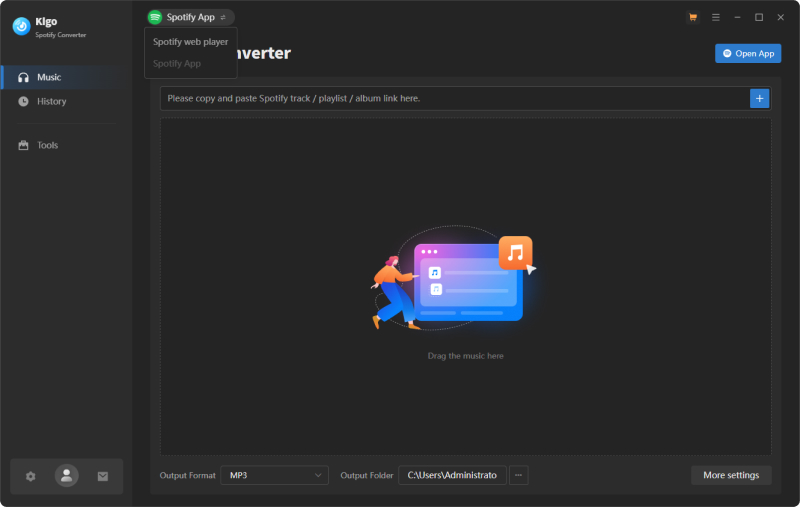
Step 1 Adjust output settings
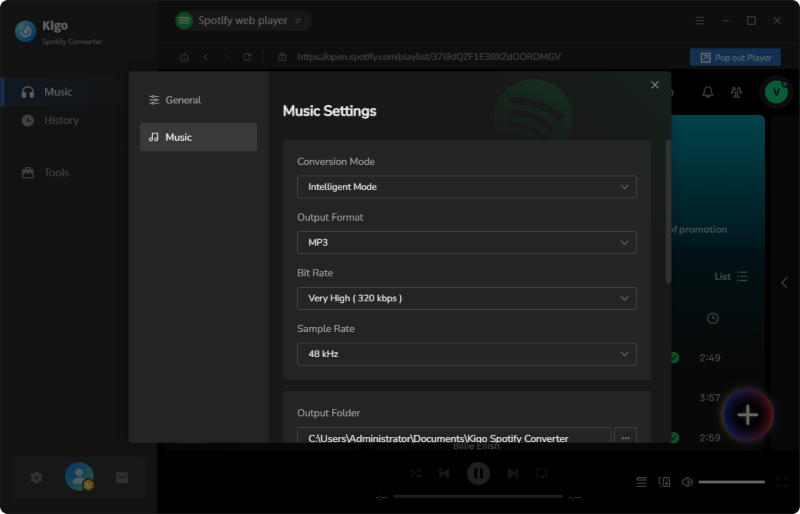
At the bottom of the program, you can quickly customize the output format and output folder. If you'd like to adjust advanced settings such as output quality, conversion speed, or file organization, click More Settings to personalize your preferences.
Here, we select MP3 as the output format for Spotify songs. For Spotify music videos and video podcasts, Kigo automatically downloads and saves them in MP4 format by default.
Step 2 Add the Spotify link for MP4 download
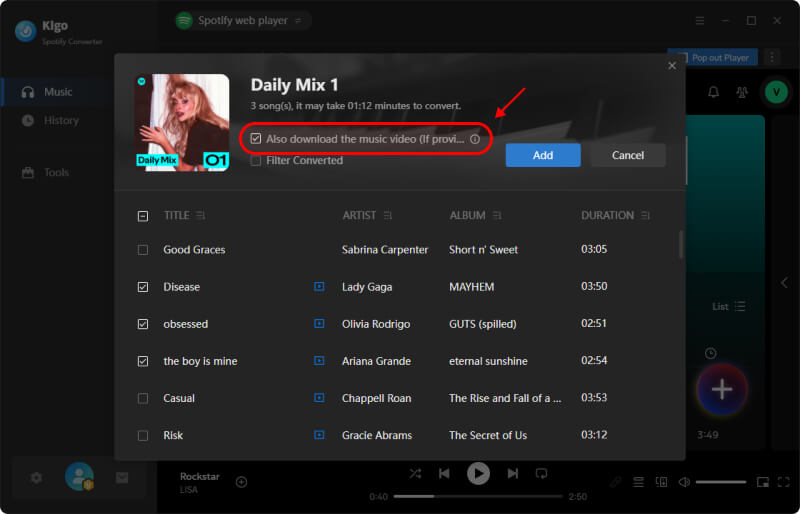
Kigo Spotify Converter embeds the Spotify web player, making it seamless to search, add, and download any Spotify songs directly within the program. Find the song or playlist that includes the music video you want to download, then click the + button in the lower-right corner to add the tracks.
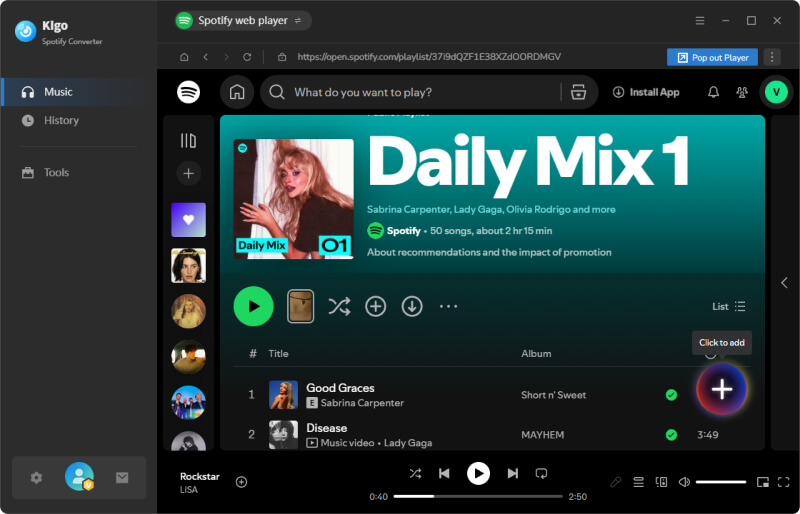
In the Add panel, make sure to check the option "Also download the music video" to include the video in your download.
Step 3 Start converting Spotify to MP4
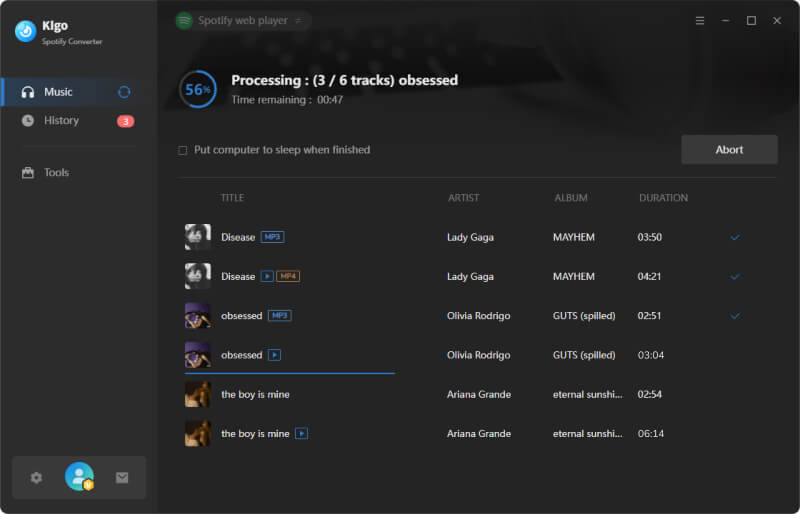
Click the Convert button to start downloading and converting Spotify music videos to MP4 while simultaneously converting Spotify songs to MP3. Kigo Spotify Converter supports batch conversion and delivers speeds of up to 10X faster, helping you save valuable time—especially when downloading hundreds of songs and videos at once.
Step 4 Find the downloaded MP4 from Spotify
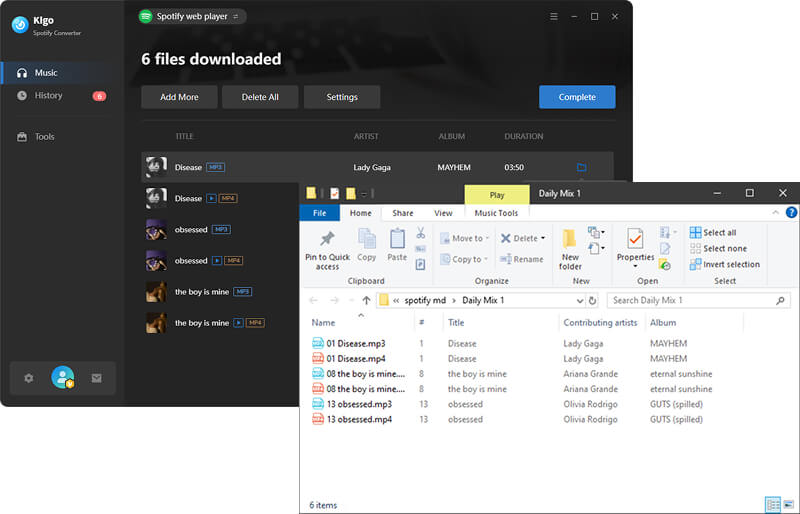
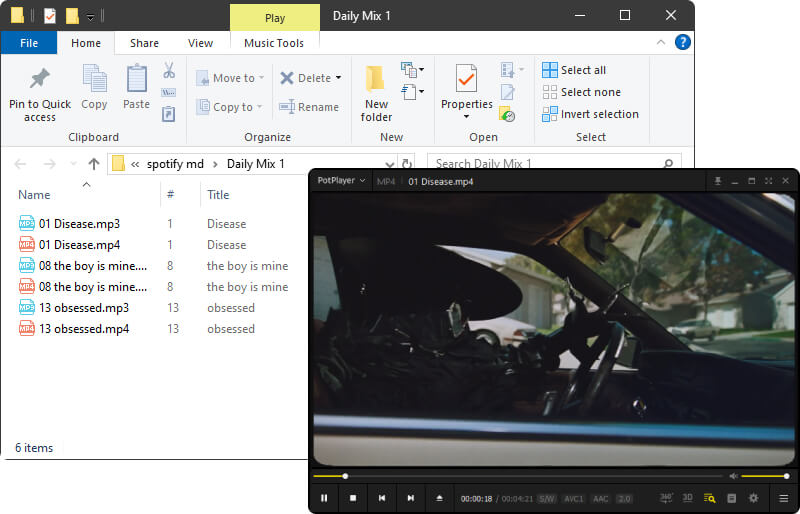
When the download progress reaches 100%, the Spotify to MP4 conversion is complete. Click the folder icon to open the destination folder directly. Since MP4 is compatible with nearly every media player and device, you can watch the MP4 version of Spotify videos on your computer or transfer them to other devices for offline viewing without any limits. Want to download more music videos? Simply click Add More and repeat the conversion steps—it's that convenient!
FAQs about Downloading Spotify Video to MP4
❓ Does Spotify download music videos?
No. Currently, Spotify does not support downloading music videos for offline viewing. This feature is not available for Spotify music video yet. Even with a Spotify Premium subscription, you cannot download music videos from Spotify at this time.
❓ Can you download Spotify music video?
With a Spotify video to MP4 converter, you can download music video from Spotify easily. Kigo Spotify Converter is a reliable option for downloading Spotify songs, music videos, and video podcasts for offline enjoyment.
❓ Are there any online Spotify video downloader?
As of now, no. Online Spotify downloaders claim to download Spotify music via a link, but when you paste a Spotify link into these websites, they only provide MP3 audio downloads—no MP4 video is supported. In other words, online Spotify downloaders do not support Spotify link to MP4 download.
Conclusion
If you want to enjoy Spotify music videos online and watch them offline, what you need is a Spotify video to MP4 downloader. For safety, stability, and performance, Kigo Spotify Converter is the ideal choice to download Spotify music videos and video podcasts to MP4, allowing you to enjoy your favorite Spotify content anytime, anywhere. It only takes 4 steps to download your favorite Spotify music videos as MP4—try it now!

Simon Durden | Editor-in-Chief
Simon Durden is the Editor-in-Chief at KigoSoft, specializing in video download and conversion. Before joining to KigoSoft, he served as a senior writer with the Any Video Converter Team. With extensive knowledge of video streaming platforms and expertise in video editing, Simon delivers high-quality content, expert tips, and in-depth tutorials in the multimedia field.