
SpotifyDown Review 2026: Is It Safe and Still Free? Best Alternative?
Is SpotifyDown still live? I wanted to use SpotifyDown to download some Spotify songs, but when I opened the website, I was redirected to open.spotify.com. Does SpotifyDown still work? If not, what are some good SpotifyDown alternatives?
SpotifyDown has been around for years as an online Spotify MP3 Converter, but it lost its previous domain and moved to a new website two years ago. So, what happened to SpotifyDown, and does it still work as before? In this article, we'll show you what has changed, how SpotifyDown works now, whether it's safe to use, and what alternatives you can consider if you want to download Spotify songs for offline listening.
Part 1. What Is SpotifyDown? Pros and Cons
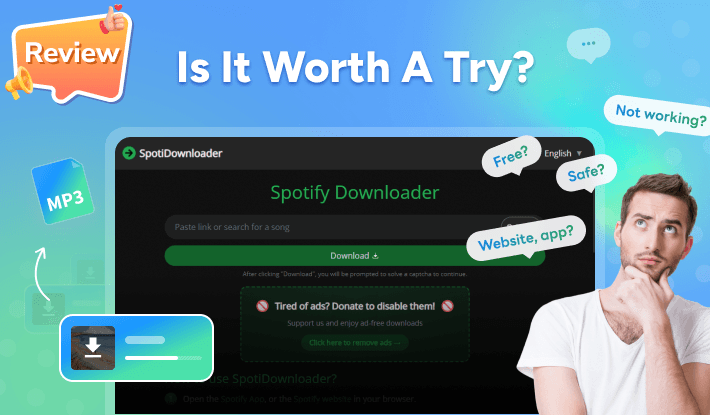
SpotifyDown is a free, browser-based Spotify downloader. You paste a Spotify song, album, or playlist link into its website, wait for it to process the link, and download the tracks as MP3 files. No app or plug-in installation is required, and you do not need to create an account. Since it runs in a browser, it works on devices with browsers such as Chrome, Firefox, and Edge.
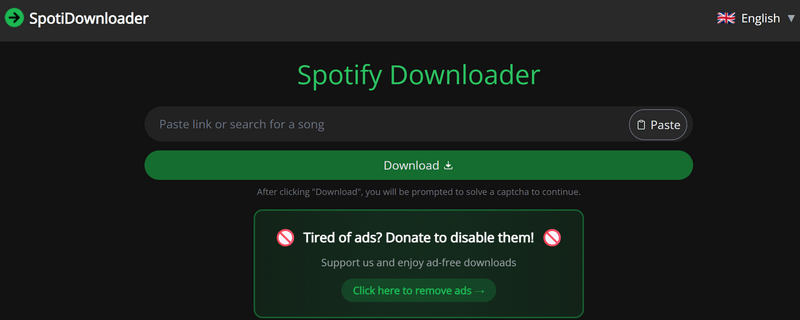
SpotifyDown website? The old domain, spotifydown.com, no longer opens the downloader. Instead, it redirects to Spotify's web player. The tool later moved to spotidownloader.com, a change that was announced in the Reddit community two years ago.

SpotifyDown app? No. It is a website-only service. You can use it in a mobile browser, but there is no official Android or iOS app.
- Free to download songs via Spotify links.
- Automatically converts Spotify tracks, albums, and playlists to MP3 audio.
- Supports downloading a single Spotify album or playlist as a ZIP file.
- Simple enough for anyone to use.
- Retains some ID3 tags like Title, Artist and Album.
- No software installation or account required.
- MP3 is the only output format.
- Ad-supported with a paid ad-removal banner displayed throughout the site.
- Does not support Spotify podcasts, audiobooks, or music videos.
- Output quality varies, per user reports — the site's team has acknowledged backend issues affecting output.
- No options to organize or sort downloaded songs, which can make library management difficult.
- No official customer support channel.
Editor's note: About the "original quality" promise
The site advertises that it preserves the original quality of your songs. However, the only output format available is MP3, which is a lossy format. Any MP3 output involves lossy encoding, so it cannot truly preserve the original audio quality. Given the variations in quality reported by users, the "original quality" claim should therefore be treated as a marketing claim rather than a guarantee of true original-quality audio.
Part 2. How Does SpotifyDown Work?
As an online Spotify playlist downloader, SpotifyDown has a straightforward workflow for downloading Spotify songs as MP3 files. Follow the steps below to see how SpotifyDown works.
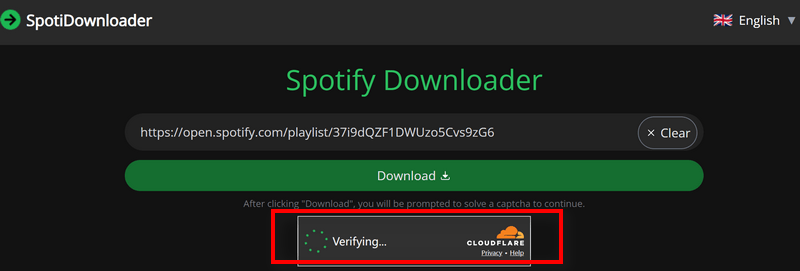
- Step 1Copy the Spotify link and paste it into the search bar of SpotifyDown website. Then complete the CAPTCHA.
- Step 2Press the Download button next to the search bar to start processing the link.
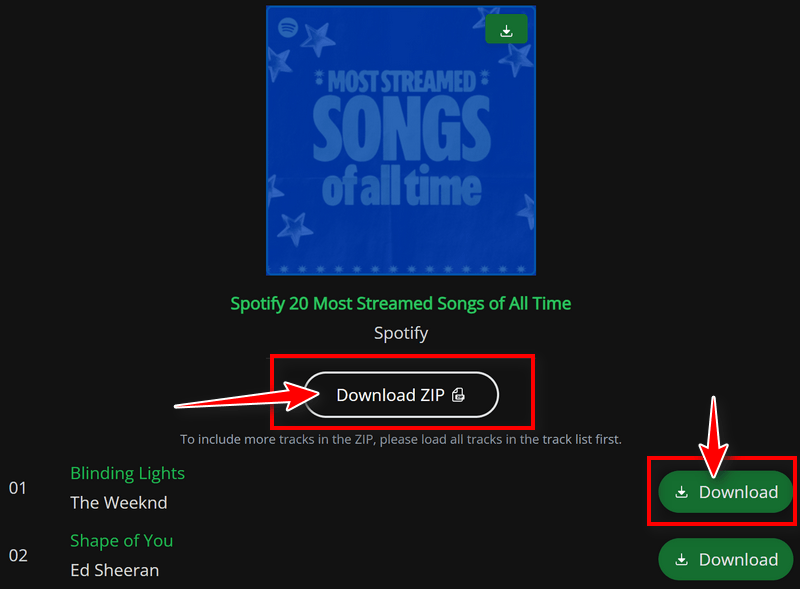
- Step 3The site reads the link and displays the playlist and individual tracks. Click Download ZIP to download the songs as a ZIP file or click Download button next to a track to download an individual song.
- Step 4Save the songs to the folder you want.
Part 3. Is SpotifyDown Safe and Legit?
Short answer: We found no widespread reports of malware from the site itself, but the ad-heavy experience and legal considerations are worth keeping in mind.
On the safety side, we did not find credible reports linking SpotifyDown itself to malware. The bigger concern is the advertising. The site uses an ad-supported model and displays a paid "Remove Ads" banner. The number and type of ads you encounter may also vary depending on your browser and ad-blocking settings.
The legal picture: Downloading music through third-party tools may conflict with Spotify's Terms of Service, which generally restricts unauthorized downloading or copying of content. Whether downloading or keeping a particular file is lawful also depends on copyright law and the circumstances in your country or region. If you use a tool like SpotifyDown, check the applicable rules where you live and avoid using downloaded content for redistribution or commercial purposes.
Part 4. Why Is SpotifyDown Not Working?
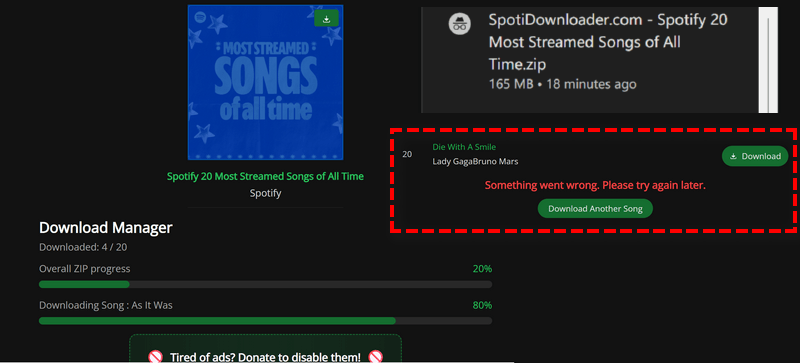
In our test, we successfully downloaded the 20-song Spotify playlist as a ZIP file, but downloading an individual track failed with the error message, "Something went wrong. Please try again later." Feedback from the Reddit community mentions issues such as corrupted MP3 files, audio that does not match the Spotify version, and the website being unreachable. Public reviews are also mixed. On Trustpilot, SpotifyDown has a 2.8/5 rating, with some negative reviews mentioning failed playlist downloads and redirects. If you encounter similar problems when using the tool, try the following troubleshooting tips:
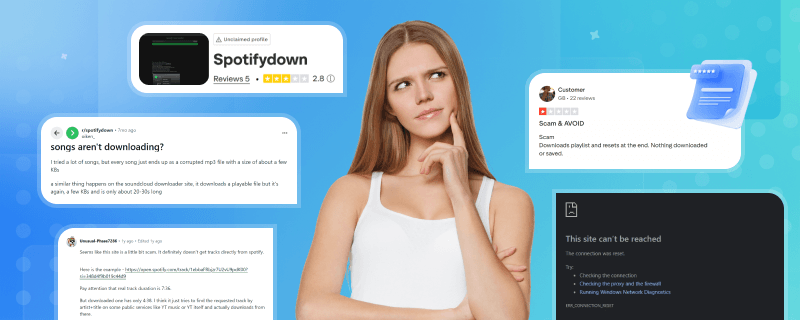
| Problem | What happens | Troubleshooting tips |
|---|---|---|
| "Something went wrong. Please try again later." | A common error during conversion. | Retry later — it is usually a server-side issue. |
| ZIP download disabled for playlists | Users see "disabled" on the ZIP option for whole playlists. | Check firewall settings or try downloading tracks individually instead. |
| Site cannot be reached | Outages and domain issues. | Try incognito mode or use a different browser. Note that if the server is down, no browser will fix it. |
| Corrupted MP3 files | The song has a few KBs and is only about 20-30s long. | Delete the broken file and try the download again. |
| Track duration not matched | For example, the real track duration is 7:36, while the downloaded one has only 4:38. | Some users suspect that the server finds the requested track by matching its artist and title on public services such as YouTube. To avoid version-matching issues, consider using a desktop Spotify downloader for more accurate downloads. |
➡️ If you've tried every troubleshooting method but it is still not working, you can consider using a professional Spotify downloader like Kigo Spotify Converter instead.
Part 5. Best SpotifyDown Alternative: Kigo Spotify Converter
If you don't think the web tool is a good fit, you can consider other online Spotify downloaders or professional desktop Spotify converters like Kigo Spotify Converter. While online tools can come with common drawbacks such as unstable servers, aggressive ads, pop-ups, and redirects, Kigo Spotify Converter offers a clean interface, reliable performance, and flexible settings. It also supports saving Spotify songs in a range of formats and quality levels for offline listening. It is a good option if you are looking for a long-term Spotify download solution.
Kigo Spotify Converter covers the things the web tool does not:
- Six output formats: MP3, AAC, WAV, FLAC, AIFF, and ALAC — you are not stuck re-compressing everything into MP3
- More content types: tracks, albums, and playlists, plus podcasts, audiobooks, and music videos
- Handy tools: free format converter, CD burner, and tag editor
- Customized output: customizable quality (up to 320 kbps) and bitrate (128–320 kbps), sample rates (44.1–48 kHz)
- Real batch downloading across multiple playlists and albums, with the original playlist order kept
- Full ID3 tags with artwork, and file names you can customize
- Up to 40x conversion speed, support pause at any time and put computer to sleep when finished
How to Use Kigo Spotify Converter to Download Spotify Music to MP3?
- Step 1 Launch Kigo Spotify Converter
- Step 2 Select the songs you want to download with Kigo
- Step 3 Set Output Parameters
- Step 4 Start to Download Spotify Music in batch
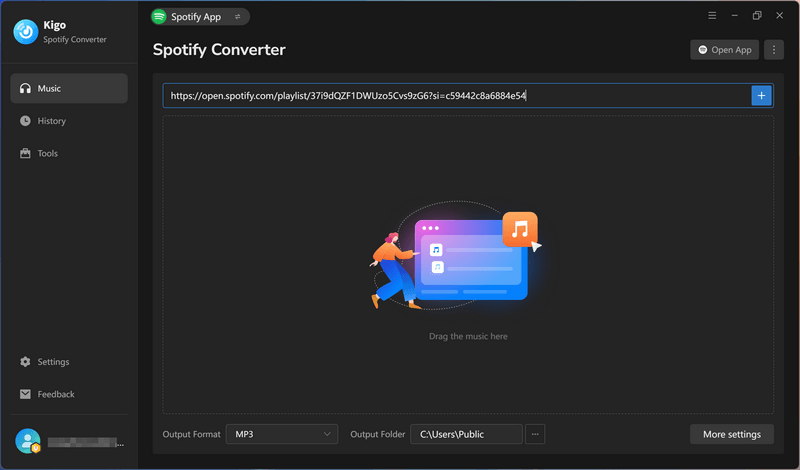
Open Kigo Spotify Converter on your computer, then drag and drop your Spotify song link onto the main interface. You can choose either Spotify App or Spotify Web Player mode as the download source.
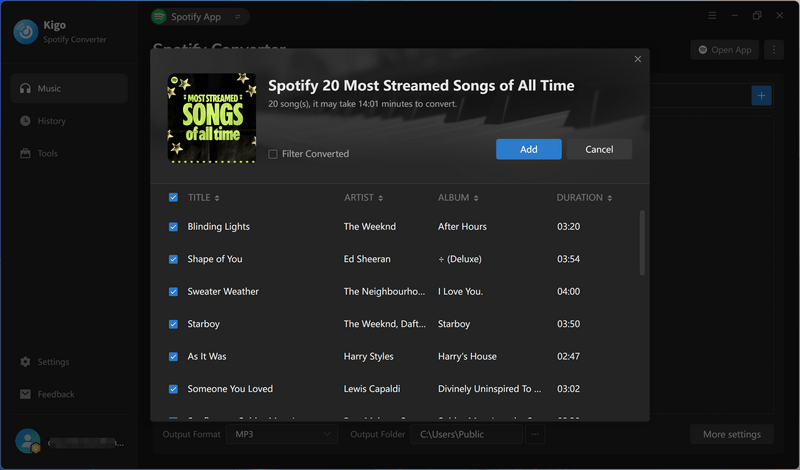
Kigo Spotify Converter will quickly detect the Spotify link you paste and display the tracks clearly. You can select all tracks or choose only the ones you want to download by clicking the Add button to add them to the conversion list. This allows you to skip unwanted tracks in a playlist. If you click Add More, you can add additional playlists and download them in batches.
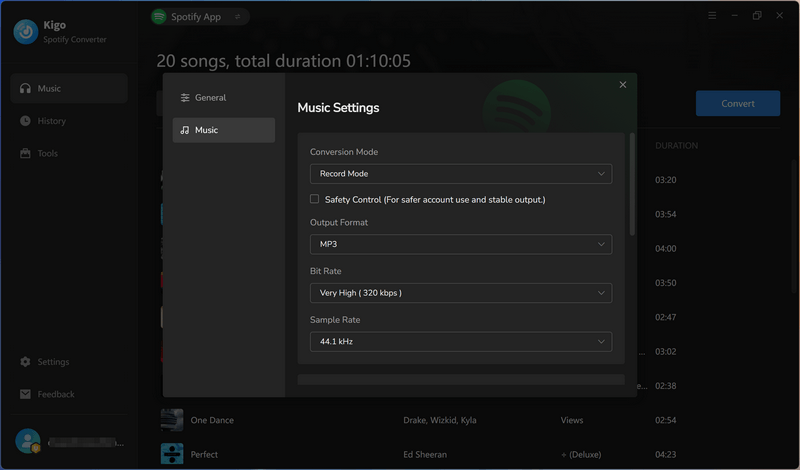
Click Settings on the left to adjust the output settings. Choose an output format from MP3, AAC, WAV, FLAC, AIFF, and ALAC. You can customize the audio quality by adjusting the bit rate and sample rate. You can also change the output folder, file naming, and file organization settings. Here, we choose MP3 as the output format with a quality of 320 kbps.
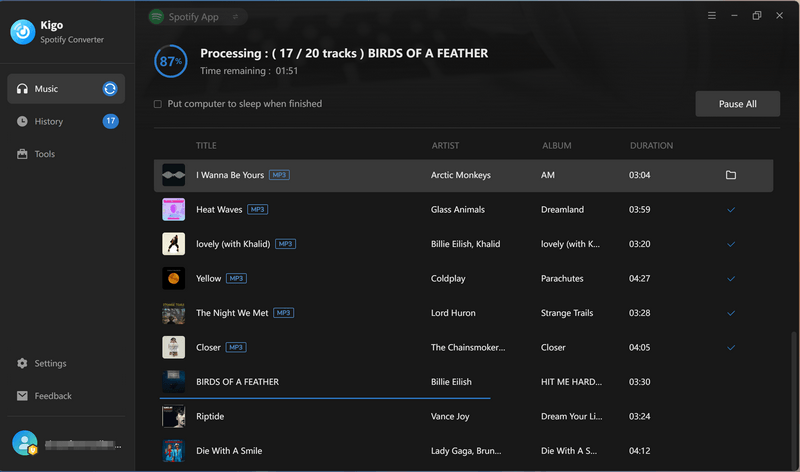
Click the Convert button to start converting Spotify music to MP3 with Kigo Spotify Converter. Once the download process reaches 100%, you can find all the downloaded songs under the History tab. To locate the files on your computer, click the Folder icon to open the output folder directly. You can then enjoy your downloaded Spotify music files offline on your devices.
SpotifyDown vs Kigo Spotify Converter: Head-to-Head
| SpotifyDown | Kigo Spotify Converter | |
|---|---|---|
| Supported Systems | Any device with a browser | Windows & macOS |
| Output Format | MP3 only | MP3, AAC, WAV, FLAC, AIFF, ALAC |
| Output Quality | Advertised as "original quality" — but it is not | Lossless quality, flexible output quality options (Up to 320 kbps) |
| Download Types | Tracks, albums, and playlists | Tracks, albums, playlists, audiobooks, music videos, and podcasts |
| Batch Download | One playlist at a time; ZIP downloads have failed for some users | Multiple playlists and albums at once |
| Playlist Order | Not preserved | Kept as in the original playlist |
| ID3 Tags | Title, album, artist, year | Artist, Title, Album, Track Number, Year, Disc Number, Artwork, etc. |
| Output File Name | Fixed | Fully customizable |
| Interface | Ad banner with paid removal option shown throughout | Clean and well-designed |
| Extra Tools | None | Audio splitter, tag editor, format converter |
| Customer Support | User reports often go unanswered | Professional techncial customer support |
| Updates | No version control — domains and service change without notice | Regular updates |
Try Kigo Spotify Converter to Save All Your Favorite Spotify Songs!
Download lossless FLAC audio. Convert Spotify songs to 320kbps MP3. Retain ID3 tags. 40X conversion speed.Part 6. FAQs about SpotifyDown MP3 Converter
❓ Is SpotifyDown free to use?
Yes. SpotifyDown is free to use, but the service is supported by advertising. You may encounter ads while using the downloader. You have to pay to remove ads.
❓ Is there a SpotifyDown app?
No. SpotifyDown is a browser-based service and does not offer an official Android or iOS app. If you prefer an app-based experience, you can consider a desktop Spotify downloader such as Kigo Spotify Converter.
❓ What audio quality does SpotifyDown provide?
SpotifyDown provides MP3 files with reported bitrates ranging from 128 kbps to 320 kbps. Although the website claims to preserve Spotify's original audio quality, MP3 is a lossy format, so the downloaded files cannot truly retain the original audio quality.
❓ Why can't I open the SpotifyDown website?
If you cannot open SpotifyDown, first make sure you are using its latest website, as the service changed domains in the past. You can also try accessing the site with a different browser or checking whether the service is temporarily unavailable. If the website remains inaccessible, you may need to consider an alternative Spotify downloader.
Conclusion
In this SpotifyDown review, we covered what happened to the service, how it works today, its pros and cons, and some practical tips for troubleshooting SpotifyDown when it stops working. If you want to avoid ads and need lossless formats, flexible settings, and more reliable performance, Kigo Spotify Converter is a practical alternative to SpotifyDown for downloading Spotify songs. It offers a clean interface and more control over the output, making it worth considering if you are looking for a more consistent Spotify downloading experience.
Note: The trial version allows you to download the first 1 minute of each file. To access the full length, please unlock it with a valid license code.